Live Stock Market Feed in Node.js: Binary WebSocket Parsing
Everyone wants to be a trader these days. Money draws people to markets, and many end up burning their savings — because they gamble instead of trade. Trading requires time, discipline, and capital. Before you put a single rupee at risk, learn the basics: price action, market behaviour, risk management.
But this post is not about trading. It is about something technical.
Today's markets run on algorithms. There are platforms that let you create strategies, backtest them, and deploy them live. But they all have limitations. Some do not allow fully custom code. Some are expensive. And if you have a strategy that no off-the-shelf tool supports, you are stuck.
The solution? Build your own feed.
In this post, we will connect directly to a broker WebSocket, parse the raw binary feed they send us, and build 5-minute OHLC candles from the tick stream. Binary parsing is a useful skill on its own. Broker feeds make it real.
This is a technical learning guide. Not a trading course.
What You Need
- An AngelOne (SmartAPI) account with API access
- Node.js v18 or higher (needed for native
BigIntsupport — used in binary parsing) - Basic JavaScript and async/await knowledge
We will use three packages:
npm install ws speakeasy dotenv
ws— WebSocket client for Node.jsspeakeasy— generates TOTP codes for authenticationdotenv— loads credentials from a.envfile
Authentication
To receive live data, we first need a feed token from AngelOne. For that, we need to log in.
AngelOne supports programmatic TOTP login — no browser, no OAuth redirect. You post your credentials and a time-based one-time password, and you get back a feed token. This is exactly what you want for a server-side algo system.
Create a SmartAPI App
Before writing any code, go to smartapi.angelbroking.com/create and create an app. You will get an API key and set a Redirect URL (required even for server-side use — just put any valid URL).
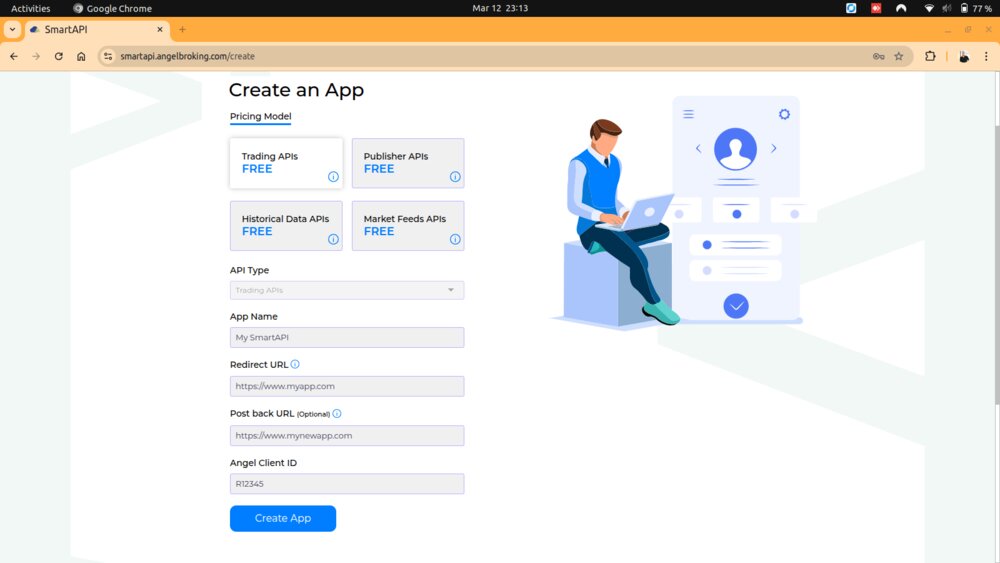
Save the API key, your client ID, password, and the TOTP secret from the QR code into your .env file.
What is TOTP?
TOTP is the same thing your authenticator app uses. It generates a 6-digit code every 30 seconds from a secret key. When you enable 2FA on AngelOne, they give you a QR code. Behind that QR code is a base32-encoded secret string. Save it — you will use it here.
With the speakeasy package, generating a TOTP code is one line:
import speakeasy from 'speakeasy';

const totp = speakeasy.totp({
  secret: process.env.ANGLEONE_TOTP_SECRET,
  encoding: 'base32',
});
The Login Request
AngelOne also requires your local IP, public IP, and MAC address in the request headers — a form of device fingerprinting.
import net from 'net';
import http from 'http';
import { networkInterfaces } from 'os';

function getMac() {
  for (const iface of Object.values(networkInterfaces())) {
    for (const item of iface) {
      if (!item.mac.startsWith('00:00')) return item.mac;
    }
  }
  return '00:00:00:00:00:00';
}

function getLocalIp() {
  return new Promise(resolve => {
    const client = net.connect({ port: 80, host: 'google.com' }, () => {
      resolve(client.localAddress);
      client.destroy();
    });
  });
}

function getPublicIp() {
  return new Promise(resolve => {
    http.get({ host: 'api.ipify.org', port: 80, path: '/' }, res => {
      res.on('data', ip => resolve(ip.toString()));
      res.on('error', () => resolve('0.0.0.0'));
    });
  });
}
Now the login function — generate a TOTP, attach the headers, and POST to AngelOne's login endpoint:
async function login() {
  const totp = speakeasy.totp({
    secret: process.env.ANGLEONE_TOTP_SECRET,
    encoding: 'base32',
  });

  const response = await fetch(
    'https://apiconnect.angelbroking.com/rest/auth/angelbroking/user/v1/loginByPassword',
    {
      method: 'POST',
      headers: {
        'Content-Type': 'application/json',
        'Accept': 'application/json',
        'X-UserType': 'USER',
        'X-SourceID': 'WEB',
        'X-ClientLocalIP': await getLocalIp(),
        'X-ClientPublicIP': await getPublicIp(),
        'X-MACAddress': getMac(),
        'X-PrivateKey': process.env.ANGLEONE_API_KEY,
      },
      body: JSON.stringify({
        clientcode: process.env.ANGLEONE_CLIENT_ID,
        password: process.env.ANGLEONE_PASSWORD,
        totp,
      }),
    }
  );

  const json = await response.json();
  if (!json.status) throw new Error('Login failed: ' + json.message);

  return json.data.feedToken;
}
The response gives us feedToken. That is what we need to open the WebSocket.
For the full authentication reference, see the AngelOne User API docs.
Finding the Nifty 50 Instrument Token
Every instrument on AngelOne is identified by a numeric token, not by name. To subscribe to Nifty 50, we need its token.
AngelOne publishes a daily instruments dump — a JSON file listing every tradeable instrument with its token, exchange, expiry, and more. Download it like this:
async function loadInstruments() {
  const res = await fetch(
    'https://margincalculator.angelbroking.com/OpenAPI_File/files/OpenAPIScripMaster.json'
  );
  return res.json();
}
The instruments file is public — no authentication needed.
Once you have the array, search for Nifty 50 by exchange segment and symbol name:
async function getNifty50Token() {
  const instruments = await loadInstruments();
  const nifty = instruments.find(
    i => i.exch_seg === 'NSE' && i.symbol === 'Nifty 50'
  );
  if (!nifty) throw new Error('Nifty 50 not found in instruments dump');
  return nifty.token;
}
Run getNifty50Token() once on startup, before opening the WebSocket.
For a full reference on the instruments API, see the AngelOne Instruments docs.
Tip: Store the Instruments Dump in MongoDB
Fetching and scanning the full JSON on every startup works fine for a single symbol, but becomes slow when you need to resolve many tokens at once. A better approach is to load the dump once and store it in MongoDB — then query by exchange and symbol instantly.
// One-time seed: fetch and insert into MongoDB
const res = await fetch('https://margincalculator.angelbroking.com/OpenAPI_File/files/OpenAPIScripMaster.json');
const instruments = await res.json();

await db.collection('angle_instruments').deleteMany({});
await db.collection('angle_instruments').insertMany(instruments);
After that, resolving any symbol is a simple query:
let result = await db.angle_instruments.findOne({
  exch_seg: exchange,
  symbol: symbol,
});

// Some equity symbols are stored with an '-EQ' suffix
if (!result) {
  result = await db.angle_instruments.findOne({
    exch_seg: exchange,
    symbol: symbol + '-EQ',
  });
}
Create an index on { exch_seg, symbol } and lookups are near-instant regardless of how large the dump grows:
await db.collection('angle_instruments').createIndex({ exch_seg: 1, symbol: 1 });
Refresh the collection once a day (the dump updates daily) and you have a fast, queryable instrument registry.
Connecting to the WebSocket
Now we have the feed token and the instrument token. Time to open the connection.
The AngelOne streaming endpoint is:
wss://smartapisocket.angelone.in/smart-stream
Authentication is passed as query parameters:
import { WebSocket } from 'ws';

function buildWsUrl(feedToken) {
  return (
    `wss://smartapisocket.angelone.in/smart-stream` +
    `?clientCode=${process.env.ANGLEONE_CLIENT_ID}` +
    `&feedToken=${feedToken}` +
    `&apiKey=${process.env.ANGLEONE_API_KEY}`
  );
}

const ws = new WebSocket(buildWsUrl(feedToken));
The WebSocket Protocol
Before subscribing, let's understand what AngelOne expects and what it sends back.
Subscribe Message
Once the connection opens, you send a JSON message to subscribe to an instrument:
{
  "correlationID": "nifty_feed",
  "action": 1,
  "params": {
    "mode": 1,
    "tokenList": [
      {
        "exchangeType": 1,
        "tokens": ["<token from instruments dump>"]
      }
    ]
  }
}
correlationID— a label you choose. Useful for debugging.action—1to subscribe,0to unsubscribe.params.mode— how much data you want per tick.params.tokenList— list of exchange + token pairs.
Feed Modes
AngelOne supports four modes. Each gives you more data but also a larger packet per tick.
| Mode | Value | What You Get |
|---|---|---|
| LTP | 1 | Last Traded Price only — smallest binary packet |
| Quote | 2 | LTP + OHLC of the day + total volume |
| SnapQuote | 3 | Everything in Quote + Open Interest + best 5 bid/ask |
| Depth20 | 4 | Full 20-level market depth |
For building 5-minute candles from ticks, LTP mode is all we need. It is compact and fast.
Constants
const MODE = {
  LTP: 1,
  Quote: 2,       // OHLC of day + volume
  SnapQuote: 3,   // Open Interest + best 5 buy/sell
  Depth20: 4,
};

const EXCHANGE = {
  NSE_CASH: 1,
  NSE_FO: 2,
};

const ACTION = {
  Subscribe: 1,
  Unsubscribe: 0,
};
Source: AngelOne WebSocket2 docs
Subscribing to Nifty 50
In ws.onopen, start a ping heartbeat and send the subscribe message:
let pingIntervalRef = null;

ws.onopen = async () => {
  // Keep the connection alive
  pingIntervalRef = setInterval(() => ws.send('ping'), 10 * 1000);

  // Subscribe to Nifty 50 in LTP mode
  ws.send(JSON.stringify({
    correlationID: 'nifty_feed',
    action: ACTION.Subscribe,
    params: {
      mode: MODE.LTP,
      tokenList: [
        {
          exchangeType: EXCHANGE.NSE_CASH,
          tokens: [await getNifty50Token()],
        },
      ],
    },
  }));
};
Parsing the Binary Feed
This is the main event. When a tick arrives on ws.onmessage, the data is a raw Buffer. No JSON. Just bytes.
AngelOne's LTP packet has a fixed byte layout. Here it is:
| Field | Offset | Size | Type | Notes |
|---|---|---|---|---|
mode |
0 | 1 byte | Int8 | Feed mode (1 = LTP, 2 = Quote…) |
exchange |
1 | 1 byte | Int8 | Exchange (1 = NSE Cash, 2 = NSE F&O) |
token |
2–24 | up to 23 bytes | ASCII | Null-terminated — stop at 0x00 |
| (padding) | 25–26 | 2 bytes | — | Reserved, not used |
seq |
27–34 | 8 bytes | Int64LE | Sequence number, little-endian |
exchangeTimestamp |
35–42 | 8 bytes | Int64LE | Epoch milliseconds, little-endian |
ltp |
43–46 | 4 bytes | Int32LE | Price × 100 — divide by 100 for rupees |
A few things worth noting:
Prices are integers scaled by 100. A raw value of 2450075 means ₹24,500.75. Always divide by 100.
Timestamps are in milliseconds. Not seconds. Pass them directly to new Date(exchangeTimestamp).
Little-endian byte order throughout. Node.js Buffer has the LE variants you need: readInt32LE, readBigInt64LE.
The token field is null-terminated ASCII. Read bytes 2 to 24, stop at the first 0x00 byte.
Here is the parser:
function parsePayload(data) {
  const mode     = data.readInt8(0);
  const exchange = data.readInt8(1);

  // Read null-terminated token string from bytes 2–24
  const tokenChars = [];
  for (let i = 2; i < 25; i++) {
    const charCode = data[i];
    if (charCode === 0x00) break;
    tokenChars.push(String.fromCharCode(charCode));
  }
  const token = tokenChars.join('');

  const seq               = Number(data.readBigInt64LE(27));
  const exchangeTimestamp = Number(data.readBigInt64LE(35));  // epoch ms
  const ltp               = Number(data.readInt32LE(43)) / 100;

  return { mode, exchange, token, seq, exchangeTimestamp, ltp };
}
readBigInt64LE returns a BigInt. Wrapping it in Number() converts it to a regular number. For timestamps and sequence numbers this is safe — they fit within JavaScript's Number.MAX_SAFE_INTEGER.
In ws.onmessage, filter out the ping response before calling the parser:
ws.onmessage = async ({ data }) => {
  // Server responds to our 'ping' with 'pong' — skip it
  if (!data.length || data === 'pong') return;

  const { token, ltp, exchangeTimestamp } = parsePayload(data);
  // ... build candles next
};
Building 5-Minute Candles
The feed gives you raw ticks. One message every time the price changes. To run a strategy, you need OHLC candles.
Here is the logic for building 5-minute candles in memory:
- Every tick — update the high and low of the currently open candle.
- When the minute hits a multiple of 5 (09:20, 09:25, 09:30…) — close the current candle, archive it, open a new one.
The key detail is deduplication. A single minute boundary can fire multiple ticks (prices move fast at 09:25:00). The min !== candles.lastMin guard makes sure we only process each boundary once.
const candlesState = {};  // keyed by instrument token

function buildCandles(candles, ltp, exchangeTimestamp) {
  const date = new Date(exchangeTimestamp);
  const min  = date.getMinutes();

  const tick5min = (min % 5 === 0) && (min !== candles.lastMin);

  if (tick5min) {
    candles.lastMin = min;

    // Rotate: closed → previous
    if (candles.closed) {
      candles.previous = candles.closed;
    }

    // Close the current candle
    if (candles.current) {
      candles.closed = { ...candles.current, c: ltp };
      candles.current = null;

      const openTime  = new Date(candles.closed.x).toLocaleTimeString('en-IN', { hour12: false });
      const closeTime = new Date(exchangeTimestamp).toLocaleTimeString('en-IN', { hour12: false });
      console.log(
        `[5min] ${openTime} → ${closeTime}` +
        `  O:${candles.closed.o}` +
        `  H:${candles.closed.h}` +
        `  L:${candles.closed.l}` +
        `  C:${candles.closed.c}`
      );
    }

    // Open a new candle
    candles.current = { x: exchangeTimestamp, o: ltp, h: ltp, l: ltp, c: ltp };
  }

  // Update running candle on every tick
  if (candles.current) {
    if (ltp > candles.current.h) candles.current.h = ltp;
    if (ltp < candles.current.l) candles.current.l = ltp;
    candles.current.c = ltp;
  }

  return tick5min;
}
The candle state per instrument:
| Field | What it holds |
|---|---|
current |
Candle being built right now (open) |
closed |
Most recently closed candle |
previous |
Candle before closed — two candles back |
lastMin |
Last boundary minute we processed (dedup guard) |
x |
Candle open time — epoch milliseconds |
Plug it into the message handler:
ws.onmessage = async ({ data }) => {
  if (!data.length || data === 'pong') return;

  const { token, ltp, exchangeTimestamp } = parsePayload(data);

  if (!candlesState[token]) {
    candlesState[token] = { lastMin: -1, current: null, closed: null, previous: null };
  }

  const tick5min = buildCandles(candlesState[token], ltp, exchangeTimestamp);

  if (tick5min && candlesState[token].closed) {
    // A candle just closed — run your strategy logic here
    console.log('Strategy input:', candlesState[token].closed);
  }
};
Keeping the Connection Alive
WebSocket connections can drop without notice. Two layers of defence here.
Ping every 10 seconds — AngelOne expects this. The server responds with 'pong'.
Inactivity watchdog — if no message arrives in 30 seconds, force a reconnect. This catches cases where the server stops sending data without actually closing the socket.
let lastMessageAt = null;

setInterval(() => {
  if (lastMessageAt && Date.now() - lastMessageAt > 30_000) {
    console.log('No messages for 30s — reconnecting...');
    ws.close();
  }
}, 5000);

ws.onmessage = async ({ data }) => {
  lastMessageAt = Date.now();
  // ...
};
Error Handling and Reconnection
Clear the ping interval when the connection drops. Then reconnect after a short delay:
ws.onerror = (event) => {
  console.error('WebSocket error:', event.message || event);
  if (ws?.readyState === WebSocket.OPEN) ws.close();
  if (pingIntervalRef) { clearInterval(pingIntervalRef); pingIntervalRef = null; }
};

ws.onclose = () => {
  console.log('WebSocket closed. Reconnecting in 3s...');
  if (pingIntervalRef) { clearInterval(pingIntervalRef); pingIntervalRef = null; }
  setTimeout(() => connect(), 3000);
};
Putting It All Together
The companion file src/index.js combines everything — TOTP login, instruments lookup, WebSocket connection, binary parsing, and 5-minute candle building.
Create a .env file in the same directory:
ANGLEONE_CLIENT_ID=your_client_id
ANGLEONE_API_KEY=your_api_key
ANGLEONE_PASSWORD=your_login_password
ANGLEONE_TOTP_SECRET=your_base32_totp_secret
Run it:
node src/index.js
You will see candles printing as they close, like this:
[5min] 09:15:00 → 09:20:00  O:24510.5  H:24530.0  L:24498.2  C:24521.7
[5min] 09:20:00 → 09:25:00  O:24521.7  H:24545.3  L:24515.1  C:24538.9
From here, add your strategy logic where the comment says "run your strategy here".
Wrapping Up
Let's recap what we built:
- TOTP login — programmatic authentication, no browser needed
- Instrument lookup — fetch the daily instruments dump, find the token for any symbol
- Binary parsing — decode AngelOne's LTP packet byte by byte
- 5-minute candles — aggregate raw ticks into OHLC candles in memory
The same pattern works for any instrument. Swap the token, subscribe to options or futures, and your candle builder handles the rest.
Let me know how it goes in the comments!
Comments (0)
Login or create an account to leave a comment.
No comments yet. Be the first!