Most of the beginner developers are surprised to see how frameworks like angular change the content of the page without refreshing the page. The concept behind this is known as routing. The frontend routing is handled by the browser. In this post, we will see how routing can be done in the frontend using vanilla javascript.
Prerequisites
- Node.js and npm installed
- basic knowledge of javascript
- basic knowledge of html/css
I encourage you to code yourself, avoid copy/paste. This will help you to understand the concept better.
First we need a local server, I'm going to use http-server. You are free to use any server, if you have knowledge to setup a local server.
Installing http-server globally
npm i -g http-server
Create a new folder, I'm going to create a folder with the name src.
create index.html for testing server in src folder.
<!DOCTYPE html>
<html lang="en">

<head>
  <meta charset="UTF-8">
  <meta name="viewport" content="width=device-width, initial-scale=1.0">
  <title>Routing in frontend</title>
</head>

<body>

  <h1>Welcome</h1>
</body>

</html>
Now run command to test http-server [path-to-folder]
http-server src
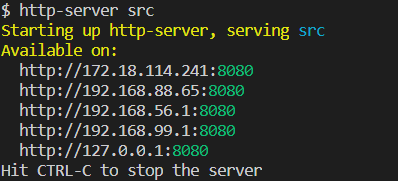
Open your browser and navigate to given link in the terminal by http-server

If you face any issue, let me know in the comments.
To implement routing in frontend, we will use History API
Let's add some navigation to our html.
<!DOCTYPE html>
<html lang="en">

<head>
  <meta charset="UTF-8">
  <meta name="viewport" content="width=device-width, initial-scale=1.0">
  <title>Routing in frontend</title>
  <style>
    body {
      margin: 0;
    }

    main {
      float: left;
      width: 100%;
    }

    nav {
      float: left;
      width: 100%;
      background-color: #ccc;
    }

    nav ul {
      list-style: none;
      margin: 0;
      padding: 0;
      float: left;
    }

    nav ul li {
      float: left;
    }

    nav ul li a {
      display: inline-block;
      padding: 10px;
    }
  </style>
</head>

<body>
  <nav>
    <ul>
      <li>
        <a href="/">Home</a>
        <a href="/about">About</a>
        <a href="/contact">Contact Us</a>
      </li>
    </ul>
  </nav>
  <main>

  </main>
</body>

</html>
Now create a javascript file name main.js and attach it in our html using script tag just before body closing tag.
...
<script src="main.js"></script>
</body>

</html>
Put alert in main.js to check if the script is successfully attached
// main.js

alert('main.js')
If you see alert: main.js, everything is okay. If there is any issue try hard refresh: ctrl + F5.
Edit main.js, add listener on the anchor tag (\<a>) for click event.
// main.js

document.querySelectorAll('a').forEach((ele) => {
  ele.addEventListener('click', (e) => {
    e.preventDefault();

    alert(e.target.text);
  })
})
Hard refresh (ctrl+F5) and click on any navigation link, an alert will come with the text of the clicked link.

Why preventDefault()? It cancels the default action that belongs to the event. Try without e.preventDefault() and see the effect yourself.
Now let's add some content to change on click.
<!DOCTYPE html>
<html lang="en">

<head>
  <meta charset="UTF-8">
  <meta name="viewport" content="width=device-width, initial-scale=1.0">
  <title>Routing in frontend</title>
  <style>
    body {
      margin: 0;
    }

    main {
      float: left;
      width: 100%;
    }

    nav {
      float: left;
      width: 100%;
      background-color: #ccc;
    }

    nav ul {
      list-style: none;
      margin: 0;
      padding: 0;
      float: left;
    }

    nav ul li {
      float: left;
    }

    nav ul li a {
      display: inline-block;
      padding: 10px;
    }
  </style>
</head>

<body>
  <nav>
    <ul>
      <li>
        <a href="/">Home</a>
        <a href="/about">About</a>
        <a href="/contact">Contact Us</a>
      </li>
    </ul>
  </nav>
  <main>

  </main>

  <template route="/">
    <h1>Home Page</h1>
  </template>

  <template route="/about">
    <h1>About Page</h1>
  </template>

  <template route="/contact">
    <h1>Contact Page</h1>
  </template>

  <script src="main.js"></script>
</body>

</html>
And change the main.js content with below code:
// main.js

const mainArea = document.getElementsByTagName('main')[0];

document.querySelectorAll('a').forEach((ele) => {
  ele.addEventListener('click', (e) => {
    e.preventDefault();

    const clickedRoute = e.target.getAttribute("href");

    const routeHtml = document.querySelector(`[route="${clickedRoute}"]`).innerHTML;

    mainArea.innerHTML = routeHtml;
  })
})
Now hard refresh the browser and click on any link. If the content is changing everything is working fine. if there is any issue let me know in the comments.

We are able to change the content related to the clicked link. But when we load the first time, there is no content displayed. we have to click the home link. Let's fix this and load the home page by default.
Just change main.js
// main.js

const mainArea = document.getElementsByTagName('main')[0];

document.querySelectorAll('a').forEach((ele) => {
  ele.addEventListener('click', (e) => {
    e.preventDefault();

    const clickedRoute = e.target.getAttribute("href");

    loadRoute(clickedRoute);
  })
})


function loadRoute(route) {
  const routeHtml = document.querySelector(`[route="${route}"]`).innerHTML;

  mainArea.innerHTML = routeHtml;
}


window.onload = () => {
  loadRoute(window.location.pathname);
};
Hard refresh (ctrl+F5) and you will see the home route (/) templated loaded by default. You may have already noticed that the URL does not change while clicking. Let's change the url as well on click.
// main.js

const mainArea = document.getElementsByTagName('main')[0];

document.querySelectorAll('a').forEach((ele) => {
  ele.addEventListener('click', (e) => {
    e.preventDefault();

    const clickedRoute = e.target.getAttribute("href");

    loadRoute(clickedRoute);
  })
})


function loadRoute(route) {
  const routeHtml = document.querySelector(`[route="${route}"]`).innerHTML;

  mainArea.innerHTML = routeHtml;

  history.pushState({ route }, null, route);
}


window.onload = () => {
  loadRoute(window.location.pathname);
};
In pushState(), the first parameter is the state object. It is useful if we listen to popstate events. This event will contain the copy of state that is passed to pushState() state parameter. Ignore the second parameter, Most browsers ignore it and third parameter the url.
You may encounter an error (Depends on your server environment), Page not found (404) in case you refresh on a path other than home(/). Click on about or contact and refresh. To fix this issue (for http-server) simply rename index.html to 404.html and refresh again error will be gone.
Let's change the page title too.
<!DOCTYPE html>
<html lang="en">

<head>
  <meta charset="UTF-8">
  <meta name="viewport" content="width=device-width, initial-scale=1.0">
  <title>Routing in frontend</title>
  <style>
    body {
      margin: 0;
    }

    main {
      float: left;
      width: 100%;
    }

    nav {
      float: left;
      width: 100%;
      background-color: #ccc;
    }

    nav ul {
      list-style: none;
      margin: 0;
      padding: 0;
      float: left;
    }

    nav ul li {
      float: left;
    }

    nav ul li a {
      display: inline-block;
      padding: 10px;
    }
  </style>
</head>

<body>
  <nav>
    <ul>
      <li>
        <a href="/">Home</a>
        <a href="/about">About</a>
        <a href="/contact">Contact Us</a>
      </li>
    </ul>
  </nav>
  <main>

  </main>

  <template route="/" title="Home Page">
    <h1>Home Page</h1>
  </template>

  <template route="/about" title="About Page">
    <h1>About Page</h1>
  </template>

  <template route="/contact" title="Contact Page">
    <h1>Contact Page</h1>
  </template>

  <script src="main.js"></script>
</body>

</html>
And change your main.js
// main.js

const mainArea = document.getElementsByTagName('main')[0];

document.querySelectorAll('a').forEach((ele) => {
  ele.addEventListener('click', (e) => {
    e.preventDefault();

    const clickedRoute = e.target.getAttribute('href');

    loadRoute(clickedRoute);
  })
})


function loadRoute(route) {
  const templte = document.querySelector(`[route="${route}"]`);

  mainArea.innerHTML = templte.innerHTML;

  const title = templte.getAttribute('title');

  history.pushState({ route }, title, route);

  document.title = title;
}

window.onload = () => {
  loadRoute(window.location.pathname);
};
Most browsers ignore title passed to history.pushState(), They may use this in the future. For now we have used document.title to change page title.
Currently all templates sit in our main page. Let's modify the code to lazy load templates. We will create seperate html file for each route. We will also handle some common scenarios like page not found and route exists but it's template is missing.
Content of 404.html file
<!DOCTYPE html>
<html lang="en">

<head>
  <meta charset="UTF-8">
  <meta name="viewport" content="width=device-width, initial-scale=1.0">
  <title>Routing in frontend</title>
  <style>
    body {
      margin: 0;
    }

    main {
      float: left;
      width: 100%;
    }

    nav {
      float: left;
      width: 100%;
      background-color: #ccc;
    }

    nav ul {
      list-style: none;
      margin: 0;
      padding: 0;
      float: left;
    }

    nav ul li {
      float: left;
    }

    nav ul li a {
      display: inline-block;
      padding: 10px;
    }
  </style>
</head>

<body>
  <nav>
    <ul>
      <li>
        <a href="/">Home</a>
        <a href="/about">About</a>
        <a href="/contact">Contact Us</a>
        <a href="/missing-page">Missing Page</a>
        <a href="/missing-template">Missing Template</a>
      </li>
    </ul>
  </nav>
  <main>

  </main>

  <script src="main.js"></script>
</body>

</html>
And our main.js
// main.js

const mainArea = document.getElementsByTagName('main')[0];

document.querySelectorAll('a').forEach((ele) => {
  ele.addEventListener('click', (e) => {
    e.preventDefault();

    const clickedRoute = e.target.getAttribute('href');

    loadRoute(clickedRoute);
  })
})

const routes = [
  {
    path: '/',
    template: 'home.tpl.html',
    title: 'Home Page',
  },
  {
    path: '/contact',
    template: 'contact.tpl.html',
    title: 'Contact Us',
  },
  {
    path: '/about',
    template: 'about.tpl.html',
    title: 'About Us',
  },
  {
    path: '/missing-template',
    template: 'missing-template.tpl.html',
    title: 'Missing Template',
  },
];

function loadRoute(route) {
  let matchedRoute = false;

  routes.forEach((r) => {
    if (r.path === route) {
      matchedRoute = r;
    }
  });

  if (!matchedRoute) {
    mainArea.innerHTML = '<h1>Page not found.</h1>';
    return;
  }
if (!matchedRoute.cachedTemplate) {
  fetch(matchedRoute.template).then(async (r) => {
    if (r.status === 200) {
      const templateBody = await r.text();
      mainArea.innerHTML = templateBody;

      history.pushState({ route: matchedRoute }, matchedRoute.title, matchedRoute.path);

      document.title = matchedRoute.title;

      matchedRoute.cachedTemplate = templateBody;
    } else {
      document.title = 'Error';
      mainArea.innerHTML = `<h1>Template missing for route ${matchedRoute.path}.</h1>`;
    }
  });
}
}

window.onload = () => {
  loadRoute(window.location.pathname);
};
Do hard refresh (ctrl+F5) and try all navigations.
We have our all routes declared in array named routes, each route is an object with path,template and title. In our loadRoute() funcation, we are simply looping through routes and store the last matched route in a variable named matchedRoute. In case no match found, we are showing: Page not found. Using fetch api, lazy loading template associated with matched route. If everything is okay then render the content of the loaded template. Show template missing error in case unable to load locate html file declared as template in matched route.
If you open your code inspector and take a look at the network tab, you will see our code is loading a template on every click.
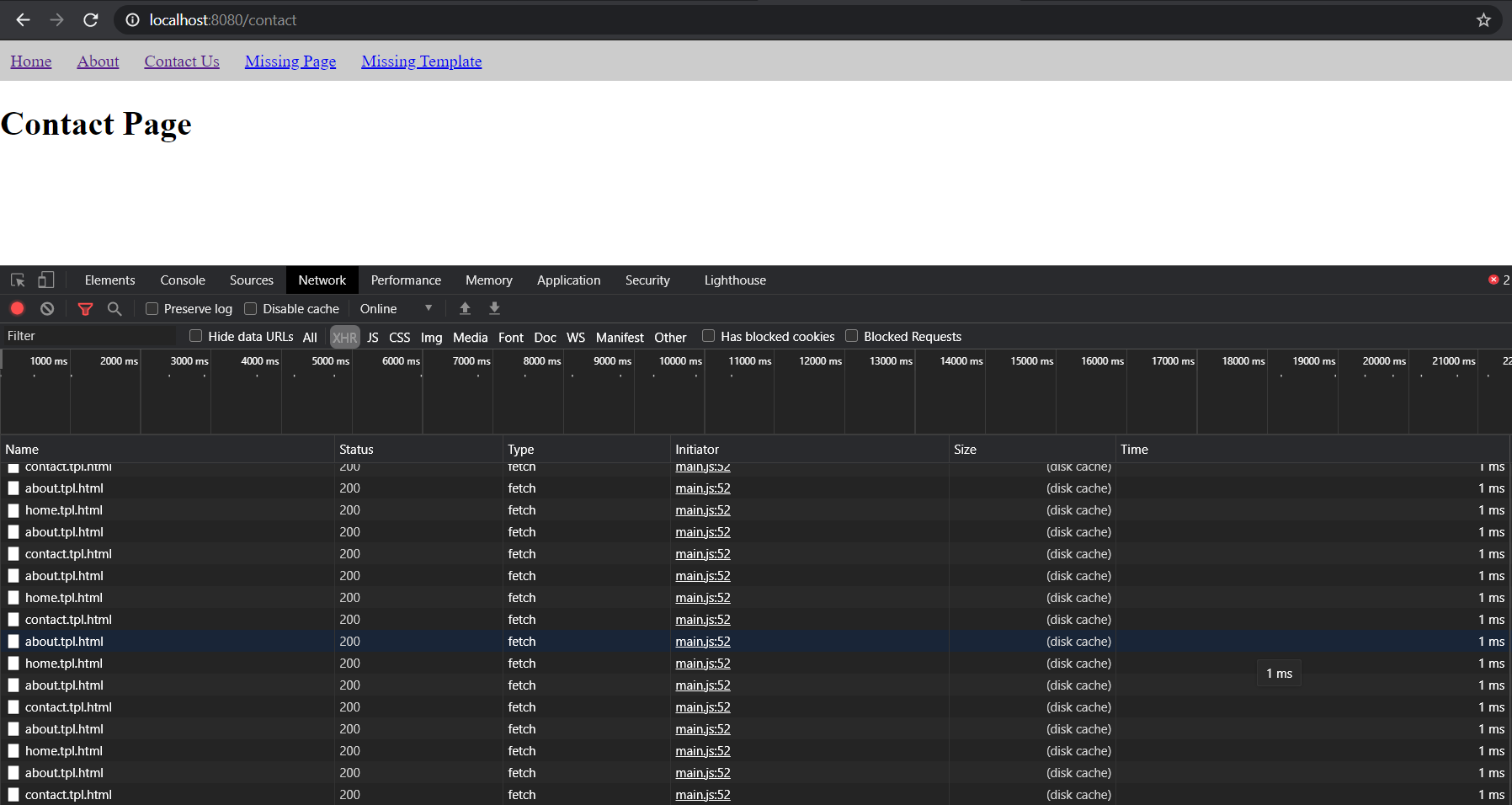
Let's code client side cache to avoid refetching the already loaded template.
// main.js

const mainArea = document.getElementsByTagName('main')[0];

document.querySelectorAll('a').forEach((ele) => {
  ele.addEventListener('click', (e) => {
    e.preventDefault();

    const clickedRoute = e.target.getAttribute('href');

    loadRoute(clickedRoute);
  })
})

const routes = [
  {
    path: '/',
    template: 'home.tpl.html',
    title: 'Home Page',
  },
  {
    path: '/contact',
    template: 'contact.tpl.html',
    title: 'Contact Us',
  },
  {
    path: '/about',
    template: 'about.tpl.html',
    title: 'About Us',
  },
  {
    path: '/missing-template',
    template: 'missing-template.tpl.html',
    title: 'Missing Template',
  },
];

async function loadRoute(route) {
  let matchedRoute = false;

  routes.forEach((r) => {
    if (r.path === route) {
      matchedRoute = r;
    }
  });

  if (!matchedRoute) {
    mainArea.innerHTML = '<h1>Page not found.</h1>';
    return;
  }

  try {
    const templateContent = await lazyLoadTemplate(matchedRoute);
    mainArea.innerHTML = templateContent;

    history.pushState({ route: matchedRoute }, matchedRoute.title, matchedRoute.path);

    document.title = matchedRoute.title;
  } catch (e) {
    document.title = 'Error';
    mainArea.innerHTML = `<h1>${e.message}</h1>`;
  }
}

async function lazyLoadTemplate(matchedRoute) {
  if (matchedRoute.cachedTemplate) {
    return matchedRoute.cachedTemplate;
  }

  const response = await fetch(matchedRoute.template);

  if (response.status === 200) {
    const templateContent = await response.text();
    matchedRoute.cachedTemplate = templateContent;

    return templateContent;
  } else {
    throw new Error(`Template missing for route ${matchedRoute.path}.`)
  }
}

window.onload = () => {
  loadRoute(window.location.pathname);
};
Hard refresh (ctrl+F5) and check the network tab of inspector again while navigating to different routes by clicking navigation links (Home, About, Contact) on the screen. You will notice it is fetching template from source only once, rest of the calls will be served from cache.
Code is very simple, we just have moved the fetch template logic to a new function named lazyLoadTemplate(). In this logic we are storing template content in cachedTemplate property of the matched route. Whenever a user clicks on the same route instead of fetching a template again it will serve the previously stored content, from the cachedTemplate property of the matchedRoute.
Hope you enjoyed coding with me. If there is any question, please feel free to ask in the comments and also let me know if you want me to cover some other frontend related topic.
Comments (0)
Login or create an account to leave a comment.
No comments yet. Be the first!