In previous post, we created a minimalist expandable framework using just Node.js runtime and it's core modules. We had successfuly pluged our Static Router in that framework. Now in this post, we are going to code a new router, more advanced then previous one that will support route params. This new router will be based on Regular expressions. So make sure to stick with the post till the end. In the beginning part we will talk about regular expressions that we are going to use later in this post to create a new advance router than the previous one. We will also write some test cases for the router, not using popular tools like Mocha! In our own handcrafted testing framework.
Let's start with the router, first focus on the main concept ie. Regular expression that we are going to use in our router. Take a look at the below routes.
- /products
- /products/:id
- /category/:categoryid/products
We need regex to match these routes and can extract the param key from the route itself.
Take a look at this regex: /\w+/g.
Open Node.js REPL
'/product/:pid/comments/:cid'.match(/\w+/g)
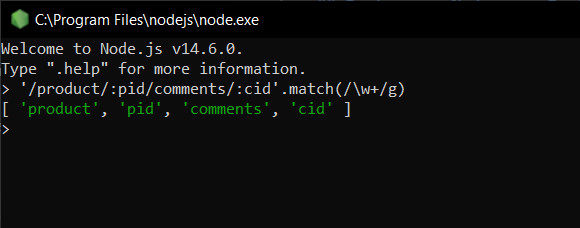
Let's break this regex:
- \w matches any alphanumeric (A to Z, 0 to 9, including lowercase alphabets and underscore)
- + means match 1 or more times
- g is flag for global searching
You can easily understand this regex behaviour, try removing + or g and see the difference in output.
- Removing g, will only give you one match
- Removing +, will only give you one letter
There is one thing missing in this regex, How do we know or detect route params. As you see the route, params start with colon (:).
Try below regex in Node.js REPL
'/product/:pid/comments/:cid'.match(/:\w+/g)
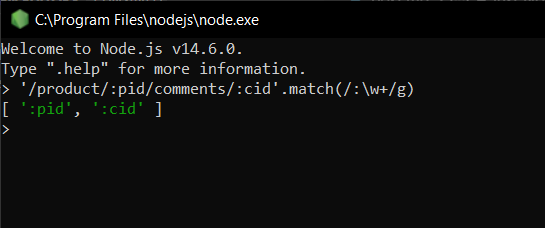
So our regex now able detect route params, a alphanumeric (\w) match should have a colon (:)
We got our expected output, but there is an issue with our regex. Try changing colon (:) position in param.
Try below regex in Node.js REPL
'/product/:pid/comments/c:id'.match(/:\w+/g)
I want you to fix this yourself, so that you can have a better understanding of regex. There are many ways in regex to do the same thing. For example: /w matches any alphanumeric and underscore, we can replace /w with [A-Za-z0-9_] or [^\s/]+.
Hint
You could use \B (Matches a non-word boundary).
Check Regular expression cheatsheet, This will help you to fix the issue and you can also learn more about regular expression in detail.
We have regex to get route params, next we need to match the full route.
Try below regex in Node.js REPL
'/product/1/comments/2'.match(/^(\/product\/(\w+)\/comments\/(\w+))$/)
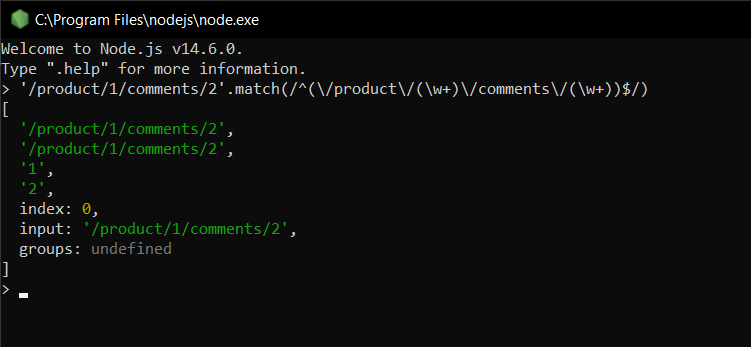
Let's break this regex
- ^ Matches the beginning of input. (This character has a different meaning when it appears at the start of a group.)
- () group
- \ used to escape /
- \w+ matches any alphanumeric (A to Z, 0 to 9, including lowercase alphabets and underscore) one or more times
- $ Matches the end of input.
I want you to explore this '/product/1/comments/2'.match(/^(?:\/product\/(\w+)\/comments\/(\w+))$/) regex and let me know in the comments why and how its output and itself is different from the other regex ('/product/1/comments/2'.match(/^(\/product\/(\w+)\/comments\/(\w+))$/)).
Now let's begin coding routers using these regular expressions.
Create a new file router.js
// router.js

class Route {
  constructor(method, path, ...handlers) {
    this.method = method;
    this.path = path;
    this.handlers = handlers;
  }
}
In the Route Class constructor, we accept request method, path and rest as handlers.
Now extract params from the path.
// router.js

class Route {
  constructor(method, path, ...handlers) {
    this.method = method;
    this.path = path;
    this.handlers = handlers;

    this.setPathParamKeys();
  }

  setPathParamKeys() {
    // remember? '/product/:pid/comments/:cid'.match(/:\w+/g)
    const keys = this.path.match(/:\w+/g);
    if (!keys) {
      this.paramKeys = [];
      return;
    }
    this.paramKeys = keys.map((m) => m.replace(':', ''));
  }
}

const route = new Route('GET', '/products/:id');
console.log(route.paramKeys);
Now run this file and you will get your route param (id) as output. You may ask, if there is no way to get rid of colon (:) just using regex. I'm trying to keep regex as simple as i can, so that it is easy to understand for you.
Let's focus on the router and add a method to match the request path with our route.
// router.js

class Route {
  constructor(method, path, ...handlers) {
    this.method = method;
    this.path = path;
    this.handlers = handlers;

    this.setPathParamKeys();
    this.setRegex();
  }

  setPathParamKeys() {
     // remember? '/product/:pid/comments/:cid'.match(/:\w+/g)
    const keys = this.path.match(/:\w+/g);
    if (!keys) {
      this.paramKeys = [];
      return;
    }
    this.paramKeys = keys.map((m) => m.replace(':', ''));
  }

  setRegex() {
    // remember? '/product/1/comments/2'.match(/^(\/product\/(\w+)\/comments\/(\w+))$/)
    // here we are replacing :param (using regex /:\w+/g) with (\w+) regex
    // why \\w not \w, extra slash is for escaping
    this.regex = new RegExp(`^(${this.path.replace(/:\w+/g, '(\\w+)')})$`);
  }
}

const route = new Route('GET', '/products/:id');
console.log('Route params', route.paramKeys);
console.log('Route Regex', route.regex);
// should match route /products/:id
console.log('Req Path Matched?', '/products/1'.match(route.regex));
// should not match route /products/:id
console.log('Req Path Matched?', '/category/1'.match(route.regex));
Now run this file
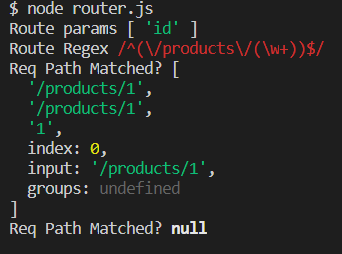
Confused? carefully read commenting in the code snippet or feel free to ask questions in the comments.
Now let's code methods to match routes and call controller functions attached with that matched route. For route controller handlers, we will use call one-by-one logic from our previous post on minimalist framework.
// router.js

class Route {
  constructor(method, path, ...handlers) {
    this.method = method;
    this.path = path;
    this.handlers = handlers;

    this.setPathParamKeys();
    this.setRegex();
  }

  setPathParamKeys() {
    const keys = this.path.match(/:\w+/g);
    if (!keys) {
      this.paramKeys = [];
      return;
    }
    this.paramKeys = keys.map((m) => m.replace(':', ''));
  }

  setRegex() {
    this.regex = new RegExp(`^(${this.path.replace(/:\w+/g, '(\\w+)')})$`);
  }

  async handle(req, res) {
    const upto = this.handlers.length - 1;

    const fn = async (index, req, res) => {
      await this.handlers[index](req, res);
      if (index < upto) {
        await fn(index + 1, req, res);
      }
    };

    await fn(0, req, res);
  }

  match(method, path) {
    // route method should match with given method
    if (this.method !== method) {
      return false;
    }

    // in case path is without params
    if (this.path === path) {
      return true;
    }

    // use regex to match route with given path
    const matched = path.match(this.regex);

    if (!matched) {
      return false;
    }

    return true;
  }
}

const route = new Route('GET', '/products/:id', () => console.log('Get product by id route called!'));

if (route.match('GET', '/products/1')) {
  route.handle();
} else {
  console.log('Route not found.');
}
Method match() will match the route against the given method and path. In case route matched with path, call route handler() method. Route handler() method will call all the given functions one after one.
If you run this file you will get: Get product by id route called!
Play with method and path in match() method to understand its working. Like use route.match('GET', '/category/1') will output: Route not found. Because our path is /products/1. Both method and path must match with route.
Now let's quickly extract route params values from the given path of the matched route.
Remember the output of /products/1 with our regex?
[
  '/product/1', // is the whole match
  '/product/1', // captured by ^(\/product\/(\w+))$
  '1', // captured by ([\w]+)
  // ignore the below
  index: 0,
  input: '/product/1',
  groups: undefined
]
So as per output, route params value is captured by (\w+), that starts from second position.
Modify match() method to collect param values from a matched route.
// router.js

class Route {
  constructor(method, path, ...handlers) {
    this.method = method;
    this.path = path;
    this.handlers = handlers;
    this.paramsMap = {};

    this.setPathParamKeys();
    this.setRegex();
  }

  setPathParamKeys() {
    const keys = this.path.match(/:\w+/g);
    if (!keys) {
      this.paramKeys = [];
      return;
    }
    this.paramKeys = keys.map((m) => m.replace(':', ''));
  }

  setRegex() {
    this.regex = new RegExp(`^(${this.path.replace(/:\w+/g, '(\\w+)')})$`);
  }

  async handle(req, res) {
    const upto = this.handlers.length - 1;

    const fn = async (index, req, res) => {
      await this.handlers[index](req, res);
      if (index < upto) {
        await fn(index + 1, req, res);
      }
    };

    await fn(0, req, res);
  }

  match(method, path) {
    // route method should match with given method
    if (this.method !== method) {
      return false;
    }

    // in case path is without params
    if (this.path === path) {
      return true;
    }

    // use regex to match route with given path
    const matched = path.match(this.regex);

    if (!matched) {
      return false;
    }

    for (let i = 2; i < matched.length; i++) {
      this.paramsMap[this.paramKeys[i - 2]] = matched[i];
    }

    return true;
  }

  params() {
    return this.paramsMap;
  }
}

const route = new Route('GET', '/products/:id', () => console.log('Get product by id route called!'));

if (route.match('GET', '/products/1')) {
  console.log(route.params());
  console.log('Product id is ->', route.params().id);
  route.handle();
} else {
  console.log('Route not found.');
}
Run this file and you will get:
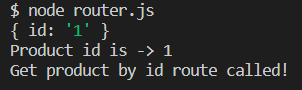
Currently our router can only handle a single route. Code a new class named Router that will hold multiple routes and have methods to add routes, find matches of method and path in the added routes.
// router.js

class Route {
  constructor(method, path, ...handlers) {
    this.method = method;
    this.path = path;
    this.handlers = handlers;
    this.paramsMap = {};

    this.setPathParamKeys();
    this.setRegex();
  }

  setPathParamKeys() {
    const keys = this.path.match(/:\w+/g);
    if (!keys) {
      this.paramKeys = [];
      return;
    }
    this.paramKeys = keys.map((m) => m.replace(':', ''));
  }

  setRegex() {
    this.regex = new RegExp(`^(${this.path.replace(/:\w+/g, '(\\w+)')})$`);
  }

  async handle(req, res) {
    const upto = this.handlers.length - 1;

    const fn = async (index, req, res) => {
      await this.handlers[index](req, res);
      if (index < upto) {
        await fn(index + 1, req, res);
      }
    };

    await fn(0, req, res);
  }

  match(method, path) {
    // route method should match with given method
    if (this.method !== method) {
      return false;
    }

    // in case path is without params
    if (this.path === path) {
      return true;
    }

    // use regex to match route with given path
    const matched = path.match(this.regex);

    if (!matched) {
      return false;
    }

    for (let i = 2; i < matched.length; i++) {
      this.paramsMap[this.paramKeys[i - 2]] = matched[i];
    }

    return true;
  }

  params() {
    return this.paramsMap;
  }
}

class Router {
  constructor() {
    this.routes = [];
  }

  get(path, ...handlers) {
    this.routes.push(new Route('GET', path, ...handlers));
  }

  post(path, ...handlers) {
    this.routes.push(new Route('POST', path, ...handlers));
  }

  find(method, path) {
    const len = this.routes.length;

    for (let i = 0; i < len; i++) {
      const r = this.routes[i];
      const matched = r.match(method, path);
      if (matched) {
        return r;
      }
    }

    return false;
  }
}

const router = new Router();

router.post('/products', () => console.log('Create product route called!'));
router.get('/products/:id', () => console.log('Get product by id route called!'));

const route = router.find('GET', '/products/id');

if (route) {
  console.log(route.params());
  console.log('Product id is ->', route.params().id);
  route.handle();
} else {
  console.log('Route not found.');
}
Run this file and you will get the same output as in the previous one:
Now we can add multiple routes. Currently our router only has get and post routes, you can add others also. Now it's your task to plug this router into our minimalist framework that we created in the previous post.
Example of middleware method to plug this new router into our framework.
class Router {

  //... rest of the code here

 middleware() {
    return async (req, res) => {
      const route = this.find(req.method, req.url);
      if (!route) {
        res.writeHead(404);
        res.end();
        return;
      }

      req.params = route.params();

      await route.handle(req, res);
    }
  }

module.exports = new Router;
Framework routes for testing should be
router.get('/', (req, res) => {
  res.writeHead(200, { 'Content-Type': 'application/json' });
  res.end(JSON.stringify({
    message: 'Welcome to my custom router!',
  }));
});

router.post('/product/:id', (req, res) => {
  res.writeHead(200, { 'Content-Type': 'application/json' });
  req.body.id = req.params.id;
  res.end(JSON.stringify({
    product: req.body,
  }));
});
Try yourself and let me know in the comments if there is any issue.
This router has the same issue as with the previous one. One trailing slash can mess our logic. I want you to figure it yourself and let me know your solution for the given problem in the comments.
Next, As I promised, Let me introduce our own test framework from scratch. Let's write a tiny testing framework to test this router.
Create a new folder name test and create 2 files, run.js and test.js
// test.js
const tests = []

function test(name, fn) {
  tests.push({ name, fn });
}

module.exports = {
  test,
  tests,
}
In test.js we just have one array and one function name test() that will insert given values as an object into that array.
// run.js
const fs = require('fs');
const path = require('path');

const { tests, test } = require('./test');

// this will make sure test function is globally available
global.test = test;

function run() {
  tests.forEach((t) => {
    try {
      t.fn()
      console.log('✅', t.name)
    } catch (e) {
      console.log('❌', t.name)
      // log the stack of the error
      console.log(e.stack)
    }
  });
}

// get the seconds argument from the given command
const baseDir = process.argv[2];

fs.readdirSync(baseDir).forEach((file) => {
  // only include file that have .test.js in name
  if (file.indexOf('.test.js') > 0) {
    require(path.join(process.cwd(), baseDir, file));
  }
});

run();
Our command to run test cases will be:
node test/run.js source/folder/path
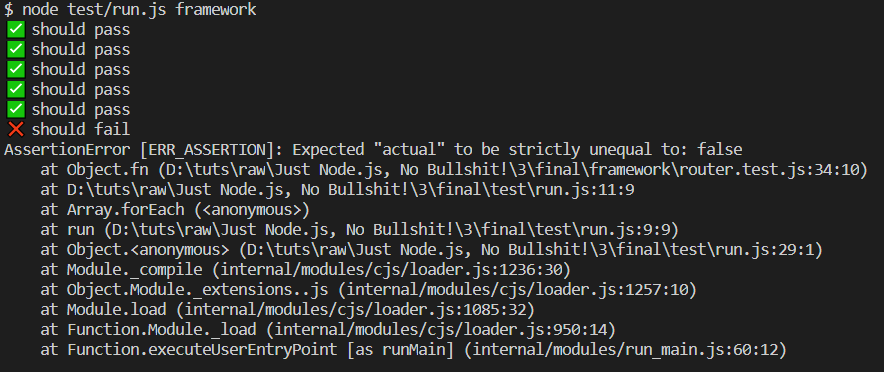
Let's quickly break down our testing framework.
- we are using test() function to add test cases and collecting that test cases in const tests = [] array
- a test case should have name and a callback
- test function to be globally available
- using process.argv to get list of arguments passed in command
- reading directory given in command arguments
- include files that have .test.js in name in the given directory
Quickly create a file name argv.js to see process.argv in action
// argv.js

console.log(process.argv);
Run this file many times with different command file arguments
Example:
node argv.js
node argv.js directory
node argv.js directory1 directory2
Now quickly create several files with some with suffix .test.js and some without it.
- a.test.js
- b.test.js
- c.js
- d.js
And run below script
// fs-scan.js
const fs = require('fs');

fs.readdirSync('./').forEach((file) => {
  // only include file that have .test.js in name
  if (file.indexOf('.test.js') > 0) {
    console.log('Match found', file);
  } else {
    console.log('Not matched', file);
  }
});
Hope you understood the concept. In our testing framework, we are using process.argv to get the base directory to scan and include files with suffix .test.js from the given directory. Function run() loops through the test array and calls each function in it.
Let me know in the comments, if there is any confusion.
This series is focused on learning internals — for production apps, use a battle-tested framework like Express, Fastify, or Koa. We're building this from scratch to understand how things work under the hood, not to replace production-ready solutions.
I’m open to suggestions and feel free to write in comments, topics that you want me to cover in this series of posts or on this blog.
HAPPY CODING 😀
Comments (0)
Login or create an account to leave a comment.
No comments yet. Be the first!