Static Http Routing in Node.js
In this post, we are going to implement very basic routing with json body parser without using any framework or library, just Node.js runtime and it's core modules.
Prerequisite
- Basic of both Javascript and Node.js
- Basic of api development
- Postman or any other api client
- Any code editor
HTTP
In Node.js, we use inbuilt module http, that allows client-server communication via HTTP Protocol. This module provides an interface for client and server. We will only focus on the server part of the module.
More on Http?
Please refer to Node.js official documentation
// server.js
const http = require('http');
Create Server Instance
// server.js
const http = require('http');

const server = http.createServer((req, res) => {
  res.writeHead(200, { 'Content-Type': 'text/plain' });
  res.end('Hello World!');
});

// start server on port 3000
server.listen(3000);
createServer accepts a callback which is called every time a request is received and it returns a server object that is an event emitter.
What is Event Emitter?
Please refer to Node.js official documentation
To start server, you need to call the listen method on the returned server instance/object with a specific port. We will discuss more on the server in upcoming posts.
Now open http://localhost:3000 in your favorite browser and you will see Hello world!
So we have our basic stupid server up and running, no matter what the path it always return Hello World!
Try yourself with different paths. for example:
http://localhost:3000/home
http://localhost:3000/about
http://localhost:3000/product/xyz/details
Lets give our stupid server some sense to distinguish between different routes/paths. We have to write some logic that can call different functions based on paths or we can say routes. For that lets first take look yourself on req. This req has the information of incoming http request/message like ip, url, method etc. More on req later, for now just add console log in our server code.
// server.js
const http = require('http');

const server = http.createServer((req, res) => {
  console.log(req.url);
  res.writeHead(200, { 'Content-Type': 'text/plain' });
  res.end('Hello World!');
});

// start server on port 3000
server.listen(3000);
Restart your server and try again with different routes. Check your console, you will get what we are looking for ie. routes. There may be extra routes like /favicon.ico etc ignore those and just focus on routes that you have commanded the server to serve.
For example: route of http://localhost:3000/product/xyz/details will be /product/xyz/details.
Don't bother with res, we will talk about that later. For now just keep in mind that req is incoming and res is outgoing. Whenever you hit url, we receive req and for reply to that req we use res ie. server response.
// server.js
const http = require('http');

function home(req, res) {
  res.writeHead(200, { 'Content-Type': 'text/html' });
  res.end('Welcome to Home Page!');
}

function about(req, res) {
  res.writeHead(200, { 'Content-Type': 'text/html' });
  res.end('Welcome to About Page!');
}

function missing(req, res) {
  res.writeHead(200, { 'Content-Type': 'text/html' });
  res.end('Opps! Page not found');
}

function handleRoute(req, res) {
  switch (req.url) {
    case '/':
      // home page route
      home(req, res);
      break;

    case '/about':
      // home page route
      about(req, res);
      break;

    default:
      // no match found.
      missing(req, res);
      break;
  }
}

const server = http.createServer((req, res) => {
  handleRoute(req, res);
});

// start server on port 3000
server.listen(3000);
Restart your server again and open localhost:3000 in browser. You will see Welcome to Home Page!. try /about, will call about function and /test will call missing function, as there is no case for /test in switch statement.
HTTP Methods
Code is very simple and straightforward. We just have some functions and a switch statement. But with this we can only handle GET requests.
What is GET?
It is a one of the HTTP verbs (GET, POST, PUT, DELETE etc) more commonly known as methods. More on HTTP Methods
Let us modify the code to support multiple methods. For now onwards, I want you to use Postman or any other api client.
Create new file with name router.js
// router.js
const router = {
  // this is our missing route handler
  '*': (req, res) => {
    res.writeHead(404, { 'Content-Type': 'application/json' });
    res.end(JSON.stringify({
      error: 'Not Found'
    }));
  },
};

function register(httpCommand, httpHandler) {
  if (router[httpCommand]) {
    throw new Error(`Command ${httpCommand} already exists.`);
  }

  router[httpCommand] = httpHandler;
}

function findHandler(req) {
  const handler = router[req.method + req.url] || router['*'];
  return handler;
}

module.exports = {
  findHandler,
  register,
};
We have one object named router and next we got some functions and module exported, Done.
Function register accepts 2 parameters, first httpCommand and second is handler. httpCommand should be like {HTTP_METHOD}{/route}. For example, the default route should be GET/ and if we have api to create a product then it may be POST/product. Second is a callback, called whenever we get a matching route.
Function findHandler used to check if we got a match then return its callback, otherwise return default/missing route callback/function. To handle missing route, I keep callback as value of property * of the router object.
Now let's modify server.js to use our router
// server.js
const http = require('http');

const router = require('./router');

router.register('GET/', (req, res) => {
  res.writeHead(200, { 'Content-Type': 'application/json' });
  res.end(JSON.stringify({
    message: 'Welcome to my custom router!',
  }));
});

router.register('POST/product', (req, res) => {
  res.writeHead(200, { 'Content-Type': 'application/json' });
  res.end(JSON.stringify({
    product: {
      name: 'Product Name',
      price: 100,
    },
  }));
});

const server = http.createServer((req, res) => {
  const handler = router.findHandler(req);
  handler(req, res);
});

// start server on port 3000
server.listen(3000);
In postman, hit url http://localhost:3000/ and response should be
{
    "message": "Welcome to my custom router!"
}
In postman, hit url http://localhost:3000/product with method set to post and response should be
{
    "product": {
        "name": "Product Name",
        "price": 100
    }
}
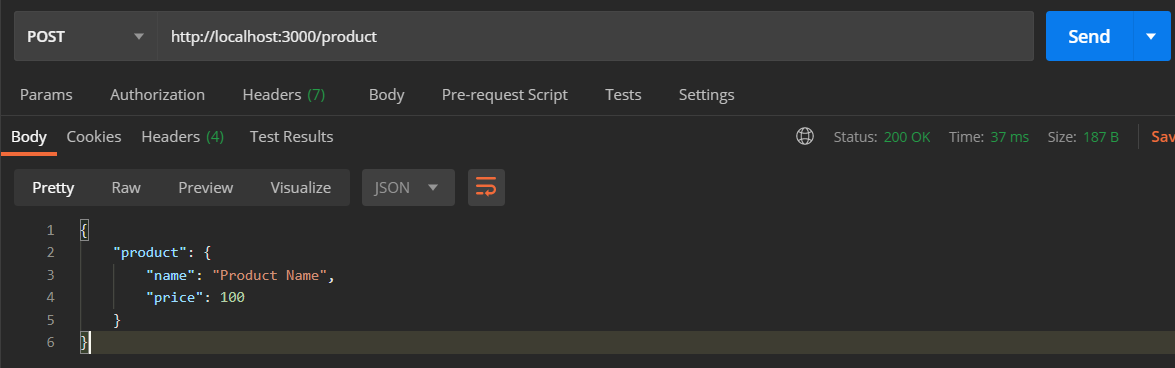
So now our server routing supports multiple http methods. Try yourself with other http verbs like PUT, DELETE etc.
HTTP Body
One more basic thing is missing in our server, http request body parser. However this is not a part of routing, but also there is no harm to code a basic parser just for demonstration purposes.
In Node.js, req is the ref of http modules IncomingMessage class which inherits Readable Stream.
More on streams: HTTP Request Readable Streams
We will use only on data, end and error events of req stream. On data, we receive data in chunks and the on end callback is called when all data has been received. If there is an error in receiving data, an error event will be emitted. We will discuss more on body parser in future posts. Currently just focus on parsing json requests only.
Let's modify server.js file.
// server.js
const http = require('http');

const router = require('./router');

router.register('GET/', (req, res) => {
  res.writeHead(200, { 'Content-Type': 'application/json' });
  res.end(JSON.stringify({
    message: 'Welcome to my custom router!',
  }));
});

router.register('POST/product', (req, res) => {
  res.writeHead(200, { 'Content-Type': 'application/json' });
  res.end(JSON.stringify({
    product: req.body,
  }));
});

function bodyParser(req) {
  return new Promise((resolve, reject) => {
    if (req.method !== 'POST') {
      resolve();
      return;
    }

    let data = '';

    req.on('data', (chunk) => {
      data += chunk.toString();
    })

    req.on('end', () => {
      try {
        // @ts-ignore
        req.body = JSON.parse(data);
      } catch (e) {
        // @ts-ignore
        req.body = {};
      }
      resolve();
    });

    req.on('error', (e) => {
      reject(e);
    });
  });
}

const server = http.createServer(async (req, res) => {
  await bodyParser(req);
  const handler = router.findHandler(req);
  handler(req, res);
});

// start server on port 3000
server.listen(3000);
Now our server supports json body and you can test that with /product route.
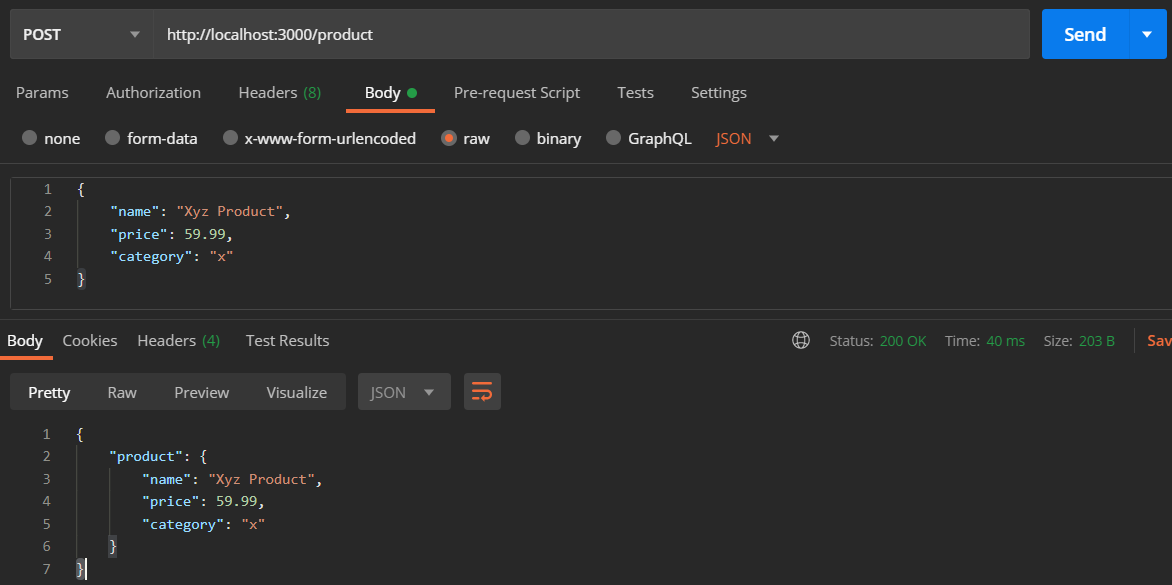
Congratulations, we have written our own http routing with json body parser. Our router has some issues that are ignored. I want you to fix that on your own.
Hint: A trailing slash can mess up our router, try http://localhost:3000/product/.
That's it for now. In future posts we will take routing step further, will add support for route params.
Let me know in the comments, what other concepts or topics you would like me to cover.
This series is focused on learning internals — for production apps, use a battle-tested framework like Express, Fastify, or Koa. We're building this from scratch to understand how things work under the hood, not to replace production-ready solutions.
Comments (0)
Login or create an account to leave a comment.
No comments yet. Be the first!