HTTP protocol is the base of data exchange on the web or maybe of your APIs too. Using this protocol, you can fetch resources like HTML documents, assets or maybe some data over the rest api. It is a client-server protocol. Request to fetch resources usually initiated by a client that may be browser or another http client.
Note: We are talking about version HTTP/1.
HTTP protocol is designed to be human readable. HTTP itself is stateless, but you can maintain session over this using cookies or local storage that is available in most browsers today.
HTTP protocol relies on TCP (One of the common transport protocols over the internet, TCP stands for Transmission Control Protocol).
To exchange messages or data, client and server use HTTP request/response pair. Request is the incoming message and response is the reply to that incoming message or request. To do this, they must establish a TCP Connection. This process requires several round trips. By default HTTP/1 opens a separate TCP connection for each HTTP request. However this is less efficient than sharing a single TCP connection, Here comes the HTTP/2 that can multiplex messages over a single connection. but using a single TCP connection for multiple requests is beyond the scope of this post. Let's stick to HTTP/1.
There are many resources available online where you can read more about HTTP protocol. In this post we will just focus on understanding how this protocol uses TCP, and will create a basic custom HTTP/1 server to understand what is going under the hood.
To create a HTTP Protocol, we need a TCP server. Luckily Node.js provides a core module named net that provides an asynchronous network API for creating stream-based TCP servers.
Let's create a tcp server using Node.js "net" module.
// index.js
const net = require('net');

const server = net.createServer((socket) => {
  socket.on('data', (data) => {
    console.log(data.toString());
  });
});

server.listen(3000);
Run this file using command: node index.js
node index.js
Now open localhost:3000 in your browser. Check Node.js console output, it will be as shown below. Don't worry it may not be exactly the same as illustrated.
$ node index.js
GET / HTTP/1.1
Host: localhost:3000
Connection: keep-alive
sec-ch-ua: "Chromium";v="88", "Google Chrome";v="88", ";Not A Brand";v="99"
Accept: text/html,application/xhtml+xml,application/xml;q=0.9,image/avif,image/webp,image/apng,*/*;q=0.8,application/signed-exchange;v=b3;q=0.9
Upgrade-Insecure-Requests: 1
sec-ch-ua-mobile: ?0
User-Agent: Mozilla/5.0 (Windows NT 10.0; Win64; x64) AppleWebKit/537.36 (KHTML, like Gecko) Chrome/88.0.4324.150 Safari/537.36
Sec-Fetch-Site: same-origin
Sec-Fetch-Mode: same-origin
Sec-Fetch-Dest: empty
Accept-Encoding: gzip, deflate, br
Accept-Language: en-US,en;q=0.9
As you can see, the first thing in the request is an url with HTTP method (also known as verb). The stuff after that are headers. Headers are a set of "key: value" pairs.
Before parsing, let's see how to reply.
To reply, you need to send headers first and after that the content.
- HTTP/[Version] [STATUS CODE] [STATUS TEXT/MESSAGE]
example: HTTP/1.1 200 OK - type of the content your are sending in the response
Content-Type: text/html - length of the content that you are sending in the reply of request
Content-Length: [calculate-length] - a blank line after headers, so that client knows we are done with headers
\r\n, why not \n? because of RFC 7230 Standards - content that you want to send
Let's see with the code example:
// index.js
const net = require('net');

const server = net.createServer((socket) => {
  socket.on('data', (data) => {
    console.log(data.toString());

    const html = '<html><body><h1>Custom HTTP Server</h1></body></html>';
    socket.write('HTTP/1.1 200 OK\r\n');
    socket.write('Content-Type: text/html\r\n');
    socket.write(`Content-Length: ${html.length}\r\n`);
    socket.write('\r\n');
    socket.write(html);
  });
});

server.listen(3000);
Now run this code using command: node index.js and open localhost:3000 or refresh if already opened.
Does content length matter? see yourself with the below example:
const net = require('net');

const server = net.createServer((socket) => {
  socket.on('data', (data) => {
    console.log(data.toString());

    const html = '<html><body><h1>Custom HTTP server</h1></body></html>';
    socket.write('HTTP/1.1 200 OK\r\n');
    socket.write('Content-Type: text/html\r\n');
    socket.write('Content-Length: 28\r\n');
    socket.write('\r\n');
    socket.write(html);
  });
});

server.listen(3000);
So, What are your views on content length matter? Let me know your findings in the comments.
Let's code a simple basic request parser that can give us request method, url, headers and content if present.
const net = require('net');

const server = net.createServer((socket) => {
  socket.on('data', (data) => {
    // console.log(data.toString());

    const reqLines = data.toString().split('\r\n');

    const req = {
      headers: {},
    };

    // first line of the request
    [req.method, req.url] = reqLines[0].split(' ');

    // second line from the request
    [, req.host] = reqLines[1].split(' ');

    // collect rest as headers
    for (let i = 2; i < reqLines.length; i++) {
      if (reqLines[i].length) {
        const [key, value] = reqLines[i].split(':');
        req.headers[key] = value ? value.trim() : value;
      }
    }

    console.log(req);

    const html = `<html><body><pre>${JSON.stringify(req, null, 2)}</pre></body></html>`;
    socket.write('HTTP/1.1 200 OK\r\n');
    socket.write('Content-Type: text/html\r\n');
    socket.write(`Content-Length: ${html.length}\r\n`);
    socket.write('\r\n');
    socket.write(html);
  });
});

server.listen(3000);
Now run this file and refresh page or navigate to localhost:3000, HURRAY!
Now what if I have to serve an asset, for example a css file. Let's first see how to serve a stylesheet and later we will parse content too.
Modify the index.js file to serve the stylesheet:
 const net = require('net');

const server = net.createServer((socket) => {
  socket.on('data', (data) => {
    // console.log(data.toString());

    const reqLines = data.toString().split('\r\n');

    const req = {
      headers: {},
    };

    // first line of the request
    [req.method, req.url] = reqLines[0].split(' ');

    // second line from the request
    [, req.host] = reqLines[1].split(' ');

    // collect rest as headers
    for (let i = 2; i < reqLines.length; i++) {
      if (reqLines[i].length) {
        const [key, value] = reqLines[i].split(':');
        req.headers[key] = value ? value.trim() : value;
      }
    }

    console.log(req);

    const stylesheet = `
      form {
        width: 400px;
        float: left;
      }
      label,input {
        width: 100%;
        float: left;
      }
      label {
        margin-bottom: 5px;
        color: blue;
      }
      input {
        margin-bottom: 20px;
        border: 1px solid blue;
      }
      button {
        color: red;
        background-color: black;
        border-color: transparent;
        padding: 10px 20px;
      }
    `;

    if (req.url === '/main.css') {
      socket.write('HTTP/1.1 200 OK\r\n');
      socket.write('Content-Type: text/css\r\n');
      socket.write(`Content-Length: ${stylesheet.length}\r\n`);
      socket.write('\r\n');
      socket.write(stylesheet);
      return;
    }

    const html = `<html>
    <head>
      <link href="main.css" type="text/css" rel="stylesheet" />
    </head>
    <body>
    <form>
      <label for="fname">First name:</label><br>
      <input type="text" id="fname" name="fname"><br>
      <label for="lname">Last name:</label><br>
      <input type="text" id="lname" name="lname">
      <button type="submit">Submit</button>
    </form>
    </body>
    </html>`;

    socket.write('HTTP/1.1 200 OK\r\n');
    socket.write('Content-Type: text/html\r\n');
    socket.write(`Content-Length: ${html.length}\r\n`);
    socket.write('\r\n');
    socket.write(html);
  });
});

server.listen(3000);
Restart your node server if already started or run index.js file with command "node index.js" and open browser, refresh or navigate to localhost:3000. Enjoying? Please don't forget to clap, Applause!
Now fill in the form and click on the submit button. Check the url, you can see your entries there in the url.

The part with question mark (?) is known as query string or search params, Node.js has an inbuilt module known as "url" that helps us with the urls. Let's see how to parse a query string using Node.js "url" module.
const net = require('net');
const { URLSearchParams } = require('url');

const server = net.createServer((socket) => {
  socket.on('data', (data) => {
    // console.log(data.toString());

    // convert buffer to string and split into lines
    const reqLines = data.toString().split('\r\n');

    // our custom request object
    const req = {
      headers: {},
    };

    // first line of the request
    [req.method, req.url] = reqLines[0].split(' ');

    // split url by ? mark to separate pathname and query string
    [req.url, qs] = req.url.split('?');

    // create URL instance
    req.qs = new URLSearchParams(qs);

    // second line from the request
    [, req.host] = reqLines[1].split(' ');

    // collect rest lines as headers
    for (let i = 2; i < reqLines.length; i++) {
      if (reqLines[i].length) {
        const [key, value] = reqLines[i].split(':');
        req.headers[key] = value ? value.trim() : value;
      }
    }

    // console.log(req);

    // our stylesheet
    const stylesheet = `
      form {
        width: 400px;
        float: left;
      }
      label,input {
        width: 100%;
        float: left;
      }
      label {
        margin-bottom: 5px;
        color: blue;
      }
      input {
        margin-bottom: 20px;
        border: 1px solid blue;
      }
      button {
        color: red;
        background-color: black;
        border-color: transparent;
        padding: 10px 20px;
      }
    `;

    // server stylesheet logic
    if (req.url === '/main.css') {
      socket.write('HTTP/1.1 200 OK\r\n');
      socket.write('Content-Type: text/css\r\n');
      socket.write(`Content-Length: ${stylesheet.length}\r\n`);
      socket.write('\r\n');
      socket.write(stylesheet);
      return;
    }

    // serve html
    let body = `<form>
    <label for="fname">First name:</label><br>
    <input type="text" id="fname" name="fname"><br>
    <label for="lname">Last name:</label><br>
    <input type="text" id="lname" name="lname">
    <button type="submit">Submit</button>
  </form>`;

    // is we have fname in the query string or search params
    if (req.qs.get('fname')) {
      body = `
      <h1>Hello, ${req.qs.get('fname')} </h1>
      ${body}
      `;
    }

    // our html template
    const html = `<html>
    <head>
      <link href="main.css" type="text/css" rel="stylesheet" />
    </head>
    <body>
    ${body}
    </body>
    </html>`;

    socket.write('HTTP/1.1 200 OK\r\n');
    socket.write('Content-Type: text/html\r\n');
    socket.write(`Content-Length: ${html.length}\r\n`);
    socket.write('\r\n');
    socket.write(html);
  });
});

server.listen(3000);
Now restart your Node.js server and refresh browser or navigate to localhost:3000, Fill in the form and click submit.
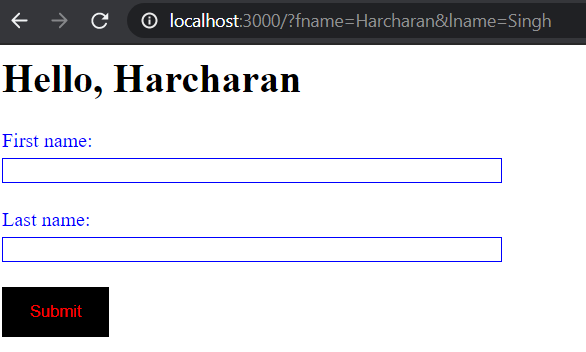
Don't mind the styling 😄!
Now lets see how to parse post request body content. Modify html form, add method attribute with value post:
 // serve html
  let body = `<form method="post">
  <label for="fname">First name:</label><br>
  <input type="text" id="fname" name="fname"><br>
  <label for="lname">Last name:</label><br>
  <input type="text" id="lname" name="lname">
  <button type="submit">Submit</button>
  </form>`;
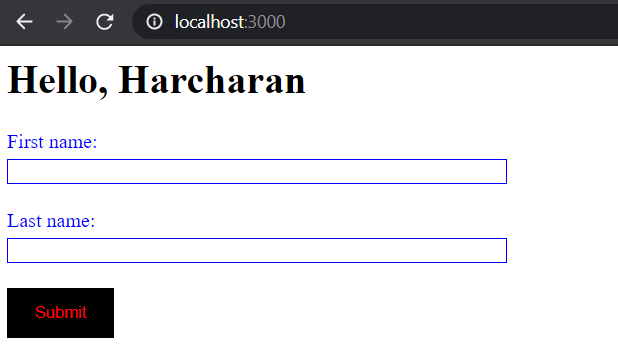
Simple post request data will also look like a query string, for example: fname=harcharan&lname=Singh. So you may ask, can we use URLSearchParams that we used to parse a query string? YES, of course you can. But we will code a custom solution.
But query or search params are visible in the url, when you set form method to post then content will be sent as request body. To read content from a request you have to check for a blank line that appears after headers. We have to look for bodies after that blank line. Let's change the headers parser logic.
let headersCompleted = false;
let reqContent = '';

// collect rest lines as headers
for (let i = 2; i < reqLines.length; i++) {
  // if we got empty line, it means we are done with headers
  if (!reqLines[i].length) {
    headersCompleted = true;
    continue;
  }

  if (!headersCompleted) {
    const [key, value] = reqLines[i].split(':');
    req.headers[key] = value ? value.trim() : value;
  } else if (headersCompleted) {
    // collect request body
    reqContent += reqLines[i];
  }
}
Complete code:
//index.js
const net = require('net');
const { URLSearchParams } = require('url');

const server = net.createServer((socket) => {

  socket.on('data', (data) => {
    // console.log(data.toString());

    // convert buffer to string and split into lines
    const reqLines = data.toString().split('\r\n');

    // our custom request object
    const req = {
      headers: {},
      body: {},
    };

    // first line of the request
    [req.method, req.url] = reqLines[0].split(' ');

    // split url by ? mark to separate pathname and query string
    [req.url, qs] = req.url.split('?');

    // create URL instance
    req.qs = new URLSearchParams(qs);

    // second line from the request
    [, req.host] = reqLines[1].split(' ');

    let headersCompleted = false;
    let reqContent = '';

    // collect rest lines as headers
    for (let i = 2; i < reqLines.length; i++) {
      // if we got empty line, it means we are done with headers
      if (!reqLines[i].length) {
        headersCompleted = true;
        continue;
      }

      if (!headersCompleted) {
        const [key, value] = reqLines[i].split(':');
        req.headers[key] = value ? value.trim() : value;
      } else if (headersCompleted) {
        reqContent += reqLines[i];
      }
    }

    // if we have body
    if (reqContent) {
      req.body = reqContent.split('&').reduce((obj, param) => {
        const [k, v] = param.split('=')
        obj[k] = v;
        return obj;
      }, {})
    }

    // our stylesheet
    const stylesheet = `
      form {
        width: 400px;
        float: left;
      }
      label,input {
        width: 100%;
        float: left;
      }
      label {
        margin-bottom: 5px;
        color: blue;
      }
      input {
        margin-bottom: 20px;
        border: 1px solid blue;
      }
      button {
        color: red;
        background-color: black;
        border-color: transparent;
        padding: 10px 20px;
      }
    `;

    // server stylesheet logic
    if (req.url === '/main.css') {
      socket.write('HTTP/1.1 200 OK\r\n');
      socket.write('Content-Type: text/css\r\n');
      socket.write(`Content-Length: ${stylesheet.length}\r\n`);
      socket.write('\r\n');
      socket.write(stylesheet);
      socket.destroy();
      return;
    }

    // ignore request other than /
    if (req.url !== '/') {
      socket.write('HTTP/1.1 404 NOT FOUND\r\n');
      socket.destroy();
      return;
    }

    // serve html
    let body = `<form method="post">
    <label for="fname">First name:</label><br>
    <input type="text" id="fname" name="fname"><br>
    <label for="lname">Last name:</label><br>
    <input type="text" id="lname" name="lname">
    <button type="submit">Submit</button>
  </form>`;

    // is we have fname in the query string or search params
    if (req.qs.get('fname')) {
      // form with method get
      body = `
      <h1>Hello, ${req.qs.get('fname')} </h1>
      ${body}
      `;
    }

    // if we have request body with fname in it
    if (req.body.fname) {
      // form with method post
      body = `
      <h1>Hello, ${req.body.fname} </h1>
      ${body}
      `;
    }

    // our html template
    const html = `<html>
    <head>
      <link href="main.css" type="text/css" rel="stylesheet" />
    </head>
    <body>
    ${body}
    </body>
    </html>`;

    socket.write('HTTP/1.1 200 OK\r\n');
    socket.write('Content-Type: text/html\r\n');
    socket.write(`Content-Length: ${html.length}\r\n`);
    socket.write('\r\n');
    socket.write(html);
    socket.destroy();
  });

});

server.listen(3000);
Restart your Node.js server or run index.js with command: node index.js and open/refresh localhost:3000 in your browser. Fill in the form and click submit.
For latest updates: join me on Telegram
Hope you enjoyed the coding with me. Have any questions? Don't hesitate, just post it in the comments.
Comments (0)
Login or create an account to leave a comment.
No comments yet. Be the first!